SeniorMatch Referral Code SM82: Get Up to 50 Extra Premium Days
Looking for a SeniorMatch referral code, promo code, or coupon?
Eligible new members can enter referral code SM82 during registration and receive up to 50 additional Premium days after purchasing a qualifying Premium Membership.
SM82 does not reduce the price shown at checkout. Instead, it extends the eligible Premium membership period at no additional charge, giving members more time to use the features included with their selected plan.
How Many Extra Premium Days Can You Receive?
The number of additional Premium days depends on the qualifying membership plan purchased.
| Premium Membership | Current Listed Price | Extra Premium Days with SM82 | Total Premium Time | Recommendation |
|---|---|---|---|---|
| 1 Month | $33.99 | 7 Extra Days | 1 Month + 7 Days | Flexible Choice |
| 3 Months | $69.99 | 15 Extra Days | 3 Months + 15 Days | ⭐ Most Popular |
| 6 Months | $109.99 | 50 Extra Days | 6 Months + 50 Days | ⭐ Best Value |
The six-month plan provides the largest SM82 benefit, adding 50 Premium days to the regular six-month membership period.
The plan with the most additional days is not automatically the right choice for every member. Consider how long you expect to remain active, which Premium features you want to use, and the total amount due at checkout before selecting a membership period.
Membership prices and offer availability may change. Review the final price, billing period, renewal terms, and membership details displayed at checkout. You can also view the current options in the SeniorMatch pricing guide .
 How to Use SeniorMatch Referral Code SM82
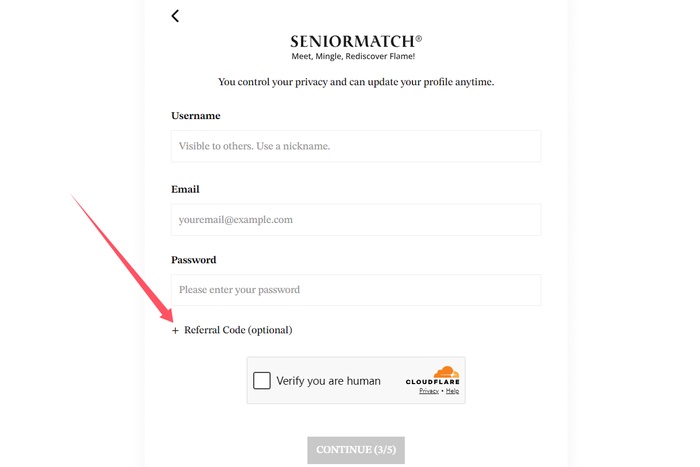
The Referral Code field appears on Step 3 of registration. It is collapsed by default, so the input field will not appear until you select “+ Referral Code (optional).”
- Begin creating a new SeniorMatch account.
- Complete the first two registration steps.
- On Step 3, select “+ Referral Code (optional).”
- Enter SM82 in the field that appears.
- Check that the code is correct and does not contain any spaces.
- Complete the remaining registration steps.
- Purchase a qualifying Premium Membership.
The Referral Code field is marked “optional” because a code is not required to create an account. Entering SM82 alone does not activate Premium Membership; the additional days apply only after a qualifying Premium purchase.
 Choosing a Premium Membership Period
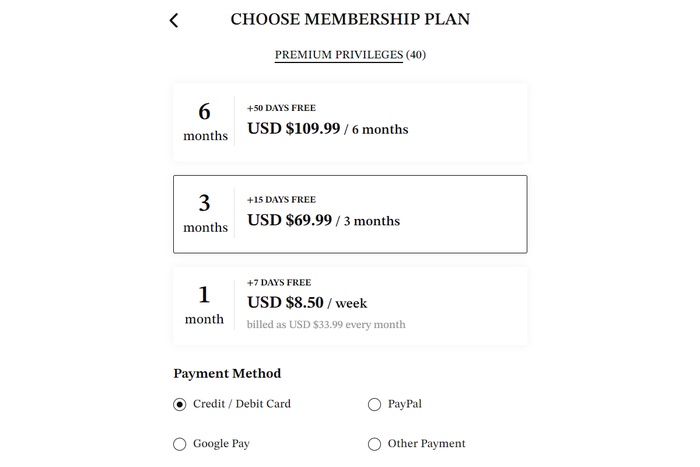
When comparing the available plans, consider both the membership period and the number of additional days included with SM82.
Compare the total charge rather than relying only on a monthly equivalent. You should also check the next billing date, automatic-renewal terms, and available renewal settings before completing the purchase.
Make More Use of Your Premium Membership
The additional days available with SM82 give eligible members more time to explore Premium features, communicate with other members, and refine their searches without changing the price of the qualifying plan.
Depending on the features currently available to your account, Premium Membership may provide:
- Additional communication options;
- Advanced filters for finding compatible members;
- Greater profile visibility;
- More control over who can view your profile;
- Access to Premium-exclusive features; and
- Premium customer support.
A longer membership period gives you more time to complete and improve your profile, browse at your own pace, start conversations, and decide which search and privacy settings work best for you.
For example, advanced search options may help you narrow results by factors such as age, location, interests, education, recent activity, or distance. Privacy settings may provide additional control over who can view or interact with your profile.
Premium Membership expands the tools available to you, but it does not guarantee replies, matches, dates, or relationships. Results can depend on location, preferences, profile quality, activity level, and how members choose to interact.
What to Check Before Purchasing Premium
Before completing a Premium purchase, review the information displayed at checkout. This helps confirm that the selected membership period and billing terms match what you intend to purchase.
- The selected membership period;
- The total amount due at checkout;
- Any applicable taxes or fees;
- The automatic-renewal terms;
- The date of the next scheduled payment;
- The cancellation instructions;
- The Premium features included with the plan; and
- The membership period associated with the purchase.
Keep a copy of the purchase confirmation for your records.
Prices, taxes, currencies, and billing options may differ depending on location, device, or payment channel. The checkout page should be treated as the final source for the price and terms applicable to your purchase.
What Should You Do If SM82 Does Not Work?
If SM82 is not accepted during registration:
- Confirm that the code is entered as SM82.
- Remove any spaces before or after the code.
- Make sure the Referral Code section is fully expanded.
- Confirm that you are entering the code before completing registration.
- Review any eligibility information displayed for your account.
If the problem continues, contact SeniorMatch customer support before purchasing. Existing accounts may not be able to apply the code retroactively.
If you have already completed a qualifying purchase but the additional membership time does not appear, keep your purchase confirmation and contact customer support for assistance.
Frequently Asked Questions
When are the additional Premium days applied?
The applicable additional days should be added after an eligible Premium Membership purchase is completed with SM82. If the updated membership period does not appear, contact SeniorMatch customer support.
Can SM82 be combined with another promotion?
Promotion compatibility may depend on the offer, membership plan, account, and checkout terms. Review the final membership details before purchasing or contact customer support if another promotion is already associated with your account.
How long will SM82 remain available?
Referral offers may change or end. Review the current offer and membership details presented during registration before purchasing Premium Membership.
Can I share SM82 with someone else?
Yes. You may share SM82 with someone who is eligible to create a new SeniorMatch account. Eligibility and current offer terms will apply to their account.
Does SM82 provide free Premium Membership?
No. A qualifying Premium Membership purchase is required. SM82 adds extra membership time to an eligible purchase rather than providing Premium Membership without payment.
Does SM82 reduce the checkout price?
No. SM82 does not reduce the listed price or provide a percentage discount. Its benefit is the additional Premium membership time associated with the qualifying plan.
Can an existing member add SM82?
SM82 is intended to be entered by eligible new members during registration. Existing members may not be able to add it after their account has been created.
If you already have an account, contact SeniorMatch customer support before purchasing to ask whether any referral benefit is available.
Start Your SeniorMatch Registration
Create your profile, enter SM82 during registration, and review the available Premium Membership options when you are ready to upgrade.