SeniorMatch Review 2026: Features, Safety, Pros & Cons
Updated: September 2026
SeniorMatch is an online dating and companionship platform designed for singles age 50 and older. Founded in 2001, it has attracted more than 2.3 million registered members interested in relationships, friendship, travel, shared activities, and meaningful companionship.
Unlike general dating apps that serve a broad range of ages, SeniorMatch focuses on the interests, lifestyles, and relationship goals of mature adults. Members can browse profiles, communicate privately, join interest-based Groups, and participate in community discussions.
This SeniorMatch review examines the registration and verification process, profile discovery, communication tools, membership options, safety features, privacy controls, mobile access, and the main factors to consider before joining.
SeniorMatch Review at a Glance
| Review Area | Our Finding |
|---|---|
| Signup experience | Account creation is straightforward, with photo verification required before interaction |
| Member discovery | Discover supports detailed browsing, while Flame offers a faster profile-by-profile experience |
| Ways to interact | Members can connect through messages, likes, winks, Groups, and community discussions |
| Standard experience | Supports profile browsing, social participation, and replies to Premium members |
| Premium experience | Adds broader messaging, profile insights, advanced filters, privacy tools, and 41 Premium privileges |
| Safety approach | Verification, monitoring, reporting, blocking, and privacy controls provide several layers of protection |
| Customer support | Support is available 24/7, with immediate Live Chat access for Premium members |
| Device access | The same account works on desktop, mobile web, iOS, and Android |
How This Review Was Prepared
We reviewed the current SeniorMatch registration flow, photo-verification instructions, Discover and Flame experiences, membership permissions, communication options, community features, privacy settings, customer-support access, mobile availability, and U.S.-dollar payment information in September 2026.
Features and account rules can change as the platform is updated. Members should review the information displayed in their own account before purchasing a subscription or changing privacy settings.
No dating platform can guarantee profile views, replies, matches, dates, or relationships. Results depend on location, preferences, profile quality, participation, and how members choose to interact.
 Who Is SeniorMatch Best For?
SeniorMatch is designed for adults over 50 who value complete profiles, shared interests, respectful communication, and connections that develop at a comfortable pace.
SeniorMatch may be a good fit for:
- Singles over 50 who want to meet people in a similar stage of life
- Divorced adults who feel ready to begin dating again
- Widowed adults interested in companionship or a new relationship
- Retired adults who would like to meet travel or activity partners
- People open to friendship as well as romantic relationships
- Members who prefer detailed profiles over appearance-only decisions
- People who enjoy connecting through Groups and community discussions
- Members who value photo verification and privacy controls
- People willing to build a genuine profile and communicate consistently
People arrive at SeniorMatch at different stages of life. Some are returning to dating after a long relationship, while others want companionship, friendship, or someone with whom they can share everyday activities. What they have in common is a preference for meeting people who understand the experiences and priorities that often come with life after 50.
How Does SeniorMatch Work?
1. Create an Account
New members provide basic account information and create their login details. Registration also includes an optional referral-code field.
2. Build Your Profile
Members can add photos and provide information about their location, lifestyle, interests, and relationship goals.
A useful profile should explain more than basic preferences. Details about hobbies, family life, travel, favorite activities, and the type of connection you want give compatible members natural reasons to begin a conversation.
3. Complete Photo Verification
Members must complete photo verification before interacting with other users.
The process is designed to confirm that a submitted image represents a real person. The image submitted specifically for verification is kept separate from public profile photos.
Verification adds an extra step to registration, but it provides more confidence than a system that allows completely unverified profiles to communicate.
4. Discover Other Members
SeniorMatch provides two main profile-discovery experiences.
Discover allows members to browse profiles and use available search preferences. It is suited to people who want to compare several profiles and focus on criteria such as age, location, interests, lifestyle, and relationship goals.
Flame presents potential connections in a faster, one-profile-at-a-time format. It is suited to people who prefer making quicker decisions while browsing.
Members can use both experiences rather than relying on only one way to find people.
5. Show Interest and Communicate
Likes and winks allow members to express interest without immediately writing a private message.
Members can also interact through Groups and community discussions. Private messaging permissions depend on whether the account uses Standard or Premium membership.
SeniorMatch Features Beyond Profile Browsing
SeniorMatch offers community features alongside its profile-discovery, communication, privacy, and customer-support tools.
| Feature | What It Helps Members Do |
|---|---|
| Dating Advice & Safety Tips | Read and exchange practical dating and safety guidance |
| First Date Ideas | Discover and share ideas for comfortable first meetings |
| Healthy-living discussions | Discuss exercise, routines, nutrition, and active living |
| Friendly Senior Jokes | Participate through lighthearted community content |
| Interest and lifestyle discussions | Connect around hobbies, experiences, and everyday interests |
| Community questions and shared experiences | Exchange ideas beyond private messaging |
| Interest-based Groups | Meet people through common topics and activities |
| 1-ON-1 EVENT | Participate in direct one-to-one interactions where available |
| 24/7 Live Chat | Receive help with account, verification, feature, or payment questions |
| 10+ privacy controls | Manage profile visibility and selected account information |
| Distance-filter search | Focus search results on members within a preferred area |
| Likes and winks | Show interest without immediately starting a private conversation |
| Profile visitor and like insights | Help Premium members identify people who have shown interest |
| Discover | Browse profiles using available preferences and filters |
| Flame | Review potential connections in a faster, one-at-a-time format |
These options allow members to choose how they participate. Some may prefer Groups and community discussions, while others may focus on private conversations or profile discovery.
Website and Mobile Experience
SeniorMatch can be accessed from a desktop computer, a mobile browser, or the SeniorMatch app for iOS and Android.
Members can sign in with the same account details across supported devices. Desktop access may be more comfortable for writing a detailed profile and reviewing search results, while mobile access is convenient for checking activity and responding to messages away from a computer.
Standard vs. Premium Membership
| Activity or Benefit | Standard | Premium |
|---|---|---|
| Create and update a profile | Yes | Yes |
| Upload profile photos | Yes | Yes |
| Browse member profiles | Yes | Yes |
| Use basic search options | Yes | Yes |
| Send likes or winks | Yes | Yes |
| Join Groups and use social features | Yes | Yes |
| Reply to messages from Premium members | Yes | Yes |
| Initiate private conversations | Limited | Yes |
| Use advanced search filters | Limited | Yes |
| See who viewed or liked your profile | Limited | Yes |
| Use additional privacy and visibility controls | Limited | Yes |
| Access Live Chat support | Available with a wait | Immediate access |
| Access all 41 Premium privileges | No | Yes |
| Premium May Fit You If | Standard May Fit You If |
|---|---|
| You want to initiate private conversations with members who interest you. | You are new to SeniorMatch and want to explore the community first. |
| You want to see who has viewed or liked your profile. | You already receive messages from Premium members and mainly want to reply. |
| You need advanced search filters to find more compatible members. | Groups and social features give you enough ways to participate and interact. |
| You want additional privacy and profile visibility controls. | You prefer to show interest through likes and winks. |
| You plan to use several of the 41 Premium privileges. | Basic profile browsing and distance-based search meet your current needs. |
| You want immediate access to Live Chat support. | You want time to decide which Premium plan best fits your needs. |
 SeniorMatch Pricing
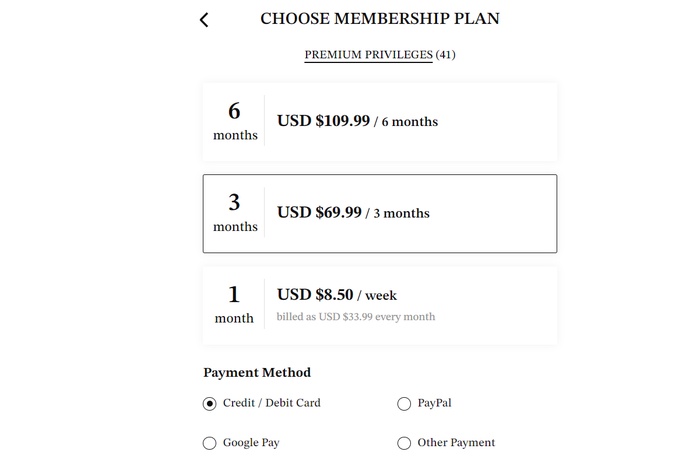
SeniorMatch offers a Standard membership with no subscription charge, along with one-, three-, and six-month Premium subscriptions. Premium starts at $33.99 for one month, while the three- and six-month options reduce the equivalent monthly cost for members who plan to use the platform longer. The six-month subscription provides the lowest equivalent monthly rate.
| Premium Period | Total Price |
|---|---|
| 1 Month | $33.99 |
| 3 Months | $69.99 |
| 6 Months | $109.99 |
Multi-month subscriptions are paid upfront, so the full amount is charged when the plan is purchased. Prices are listed in U.S. dollars and are consistent across all four SeniorMatch platforms. Applicable taxes may be added in some countries or regions. Subscription prices and available offers may be adjusted from time to time, so members should review the current amount displayed at checkout before purchasing.
For equivalent monthly costs, percentage savings, payment information, and current referral benefits, read the complete SeniorMatch cost and pricing guide.
Meet Singles Over 50 Who Share Your Interests
Create your SeniorMatch profile and connect through dating, friendship, Groups, travel, and shared activities.
CREATE YOUR PROFILEHow SeniorMatch Supports Member Safety and Privacy
SeniorMatch combines photo verification with profile monitoring, reporting, blocking, and more than 10 privacy controls.
What Photo Verification Does
Photo verification is intended to confirm that a member’s submitted image represents a real person. A verification badge can provide additional confidence when viewing a profile.
However, verification should not be treated as proof of every personal statement, intention, or background detail. Members should still use their own judgment when communicating online.
Reporting and Blocking
Members can block unwanted contact and report suspicious profiles or conversations for review.
Warning signs include:
- Requests for money, gift cards, or banking information
- Sudden financial emergencies
- Pressure to share sensitive personal details
- Requests to leave the platform immediately
- Personal stories that repeatedly change
- Pressure to meet before trust has been established
Privacy Controls
SeniorMatch provides more than 10 privacy controls related to profile visibility, location information, online status, anonymous browsing, and selected account activity.
Privacy settings should balance personal comfort with discoverability. Settings that are too restrictive can reduce the number of compatible members who can find the profile.
Verification and moderation can reduce risk, but no online platform can remove every risk. Keep early conversations on the platform, protect personal and financial information, and arrange first meetings in public places.
SeniorMatch Pros and Cons
| Pros | Cons |
|---|---|
| Designed around the dating and social interests of adults over 50 | Photo verification adds another step before interaction |
| Supports relationships, friendship, companionship, travel, and shared activities | Standard members have limits on initiating private conversations |
| Offers detailed and faster profile-browsing experiences | New members may need time to discover which features are most useful |
| Provides Groups and social features beyond private messaging | Members focused only on messaging may not use every community feature |
| Includes more than 10 privacy controls | Restrictive search or privacy settings can reduce profile visibility |
| Works on desktop, mobile web, iOS, and Android | Building a genuine connection requires patience and participation |
How to Get Better Results on SeniorMatch
Complete the Important Profile Sections
Explain what you enjoy, how you spend your time, and what type of connection you want. Specific information helps compatible members recognize shared interests.
Use Recent and Varied Photos
Choose clear, current photos that show both appearance and personality. A natural portrait and images connected to hobbies or activities can provide a more complete introduction.
Review Search Preferences
Location, age range, lifestyle preferences, and distance filters affect which profiles appear. Criteria that are too narrow may hide potentially compatible members.
Check Privacy and Visibility Settings
Make sure your profile can be discovered by the types of people you want to meet. Privacy controls should protect your comfort without making the profile unnecessarily difficult to find.
Focus on Active Members
Online and recent-activity indicators can help you focus on people who are more likely to see and respond to an interaction.
Use Shared Interests to Begin Conversations
Groups, discussions, and community features provide natural conversation topics. Referring to a shared hobby, trip, pet, or activity usually creates a stronger opening than sending a generic greeting.
Frequently Asked Questions
What do the green dot and green circle mean?
A green dot indicates that a member is currently online. A green circle indicates that the member was online recently.
Is my verification photo visible on my profile?
No. The image submitted specifically for verification is kept confidential and is not displayed as a public profile photo.
Can I complete photo verification without a computer camera?
Yes. If a desktop or laptop does not have a suitable camera, members can use a compatible mobile device and follow the verification instructions shown in their account.
Can I use my SeniorMatch account on different devices?
Yes. Members can access the same account from a desktop computer, mobile browser, iOS app, or Android app using the same login details.
Can members use private photo albums?
Yes. SeniorMatch provides public and private photo options. Access to a private album is controlled by the member who owns it.
Can I change my search and privacy settings later?
Yes. Members can return to their account settings to adjust available search preferences and privacy controls.
Final Verdict: Is SeniorMatch Worth It in 2026?
SeniorMatch is most rewarding for adults over 50 who create a genuine profile, use current photos, participate respectfully, and allow time for relationships to develop.
Standard membership provides several ways to explore the community and interact without immediately choosing a subscription. Premium gives members greater control over private communication, search, profile insights, privacy, and visibility.
Eligible new members can enter referral code SM82 during registration. A qualifying Premium purchase may then receive up to 50 additional Premium days.