Want more time to make meaningful connections on SeniorMatch? New members can use SeniorMatch referral code SM50 during registration to receive up to 50 extra Premium membership days after purchasing a qualifying plan. Whether you are just getting started with senior dating or looking forward to meeting someone new, this offer gives you additional time to explore profiles, enjoy conversations, and discover potential connections.
The bonus depends on the Premium plan you choose: 7 extra days with a 1-month plan, 15 extra days with a 3-month plan, or 50 extra days with a 6-month plan. These additional days are included at no extra charge beyond the qualifying membership purchase. SM50 extends your membership period rather than reducing the checkout price.
Good news for iPhone users: You can claim SM50 through the SeniorMatch website using Safari or another browser. After registering and upgrading through the website, simply sign in to the SeniorMatch iOS app with the same email address and password. The referral code is also supported during registration through the Android app, but not during registration within the iOS app.
Choose Your SM50 Bonus: 7, 15, or 50 Extra Days
Different members have different dating goals, schedules, and budgets. Some prefer to begin with a shorter membership, while others want more time to get to know people without feeling rushed. SM50 offers additional Premium membership days across three qualifying plans.
- 1-Month Premium Membership – 7 Bonus Days: A shorter starting period for new members who want to explore SeniorMatch before making a longer commitment.
- 3-Month Premium Membership – 15 Bonus Days: A flexible option for members who want additional time to discover profiles, start conversations, and build connections.
- 6-Month Premium Membership – 50 Bonus Days: The largest SM50 bonus, suitable for members who already intend to use SeniorMatch over a longer period.
You do not need to purchase the longest membership to benefit from SM50. Choose the plan that suits your preferences and budget, and review its current price and included features before upgrading.
Remember: Enter SM50 during registration. The code must be entered before you finish creating your account to qualify for this offer.
How to Claim Your SeniorMatch SM50 Bonus
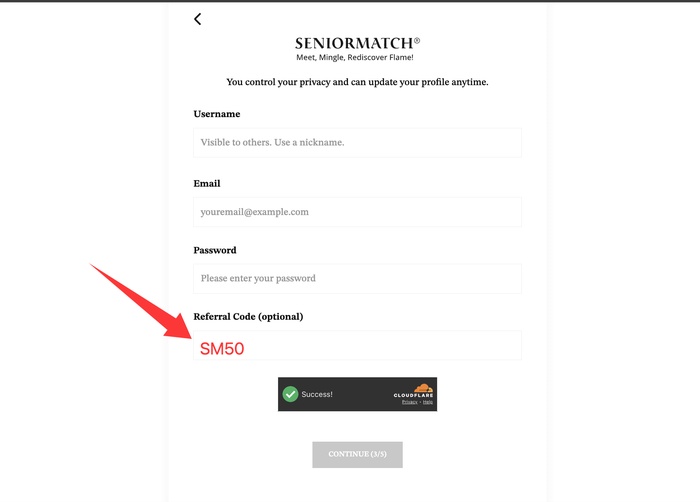 Getting your SM50 bonus is straightforward, but there is one important detail: you must enter the referral code during registration, not after your account has been created.
- Start your registration. Visit the SeniorMatch website or open the SeniorMatch Android app to create a new account.
- Find the referral code field. Look for the referral code option during signup. If the section is collapsed, expand it to reveal the input field.
- Enter SM50. Type the code exactly as shown, without additional spaces.
- Complete your registration. Follow the remaining steps to create your SeniorMatch account.
- Choose a qualifying Premium plan. Review the available membership options, prices, features, and billing terms.
- Complete your paid upgrade. After your qualifying purchase is confirmed, the corresponding bonus membership days are added automatically.
There is no separate reward application to submit after your qualifying purchase. You can review your membership information to check that the additional days have been applied.
Already registered without SM50? Under this offer's rules, the referral code cannot be added retroactively after account creation. Existing members can contact SeniorMatch customer support to ask about other available promotions.
Using an iPhone or iPad? You Can Still Claim SM50
If you prefer dating through your iPhone or iPad, you do not have to miss out on the SM50 offer. Although the referral code is not supported during registration within the SeniorMatch iOS app, you can register and upgrade through the SeniorMatch website, then continue using your account in the iOS app.
How iPhone and iPad Users Can Get the Bonus
- Open Safari or another browser on your iPhone or iPad.
- Visit the SeniorMatch website and begin creating a new account.
- Enter SM50 in the referral code field during registration.
- Complete registration and purchase a qualifying Premium membership through the website.
- Open or download the SeniorMatch iOS app.
- Sign in using the same email address and password you used on the website.
Your SeniorMatch account can be accessed across supported platforms. After completing an eligible website registration and Premium upgrade, you can log in through the iOS app and continue using your membership.
Important distinction: SM50 is not available during iOS app registration. This restriction does not prevent iPhone or iPad users from claiming the offer through the website or accessing their membership through the iOS app afterward.
Why Extra Premium Days Can Make a Difference
Dating after 50 often comes with a different perspective. Many people are less interested in rushing toward a relationship and more interested in finding someone whose values, interests, and expectations fit their lives.
Getting to know another person takes time. A conversation might begin with a shared hobby, develop through thoughtful messages, and eventually lead to plans for a first meeting. Not every connection moves at the same pace, and there is no reason it should.
Explore Connections at Your Own Pace
Additional membership days give you more flexibility to browse profiles and discover people who interest you. Instead of feeling pressured to make quick decisions, you can spend time considering what kind of relationship you want.
Keep Conversations Going
A promising conversation does not always develop overnight. Work, family commitments, travel, and everyday routines can influence when people are available to communicate. Extra Premium time provides more room for conversations to develop naturally.
Make Your Membership Fit Your Schedule
Whether you enjoy checking SeniorMatch regularly or prefer to connect when you have spare time, bonus membership days can provide additional flexibility without requiring you to purchase those extra days separately.
Of course, SM50 does not guarantee replies, dates, or relationships. Its benefit is additional time on an eligible Premium membership, allowing you to make use of the features included in your selected plan.
What Happens After You Upgrade?
Once your qualifying Premium purchase has been confirmed, the applicable SM50 bonus days are added automatically to your membership. You do not need to enter the referral code again or submit a separate request.
After upgrading, review your membership information and keep a copy of your purchase confirmation. If the expected bonus days do not appear, SeniorMatch customer support can review whether the referral benefit was applied.
Review Your Membership and Billing Terms
Before purchasing any Premium plan, take a moment to review the full membership terms. Important details include:
- The total purchase price and any applicable taxes.
- The Premium features included with your selected plan.
- Whether your subscription renews automatically.
- The renewal price and next scheduled payment date, if applicable.
- How to manage or cancel automatic renewal.
- How the additional SM50 days affect your membership period.
Bonus membership days do not automatically cancel subscription renewal. If you have questions about how your bonus period relates to your billing schedule, contact customer support before purchasing.
Membership prices, terms, and promotional availability may change. Always review the current information presented during checkout.
Who Can Use the SM50 Referral Code?
SM50 is intended for eligible new SeniorMatch members who enter the code during registration and subsequently purchase a qualifying Premium membership.
To qualify for the offer:
- You must be registering a new SeniorMatch account.
- You must register through the SeniorMatch website or Android app.
- You must enter SM50 during the registration process.
- You must complete a qualifying paid Premium membership upgrade.
- You must meet the applicable membership and promotional terms.
If you use an iPhone or iPad, complete your registration and qualifying upgrade through the website. You can then sign in to the iOS app using the same account.
The SM50 bonus cannot be assumed to apply to existing accounts, previously completed purchases, or other promotional offers unless the applicable terms specifically allow it.
Frequently Asked Questions About SeniorMatch SM50
Is SM50 a SeniorMatch discount code?
SM50 is a referral code that adds extra Premium membership days after an eligible paid upgrade. It does not reduce the membership price shown at checkout.
How many extra days will I receive?
Eligible new members receive 7 bonus days with a 1-month Premium plan, 15 bonus days with a 3-month plan, or 50 bonus days with a 6-month plan.
Do I get the bonus simply by entering SM50?
No. Entering SM50 during registration is required, but you must also complete a qualifying paid Premium membership upgrade to receive the additional days.
Can I use SM50 on the SeniorMatch website?
Yes. Eligible new members can enter SM50 during website registration and receive the corresponding bonus after completing a qualifying Premium purchase.
Does SM50 work on the Android app?
Yes. The SeniorMatch Android app supports entering SM50 during new-account registration. A qualifying paid Premium upgrade is required to receive the bonus.
Can I use SM50 when registering through the iOS app?
No. The referral code is not supported during registration through the SeniorMatch iOS app. However, iPhone and iPad users can register through the SeniorMatch website in a mobile browser and enter SM50 there.
Can I use the SeniorMatch iOS app after registering with SM50 on the website?
Yes. After registering and completing a qualifying Premium upgrade through the website, you can log in to the SeniorMatch iOS app using the same email address and password. Your account and membership can be accessed across supported platforms.
Do I have to upgrade immediately after registration?
The offer requires SM50 to be entered during registration and a qualifying paid Premium upgrade to receive the bonus. Review the current promotional terms for any additional timing or eligibility requirements.
Can I add SM50 to an existing account?
No. Under this offer's rules, SM50 must be entered during new-account registration and cannot be added retroactively after registration is complete.
What if I cannot find the referral code field?
Make sure you are registering a new account through the SeniorMatch website or Android app. Expand the referral code section if necessary. If the field remains unavailable, contact customer support before completing registration.
What should I do if my bonus days do not appear?
Review your membership information and purchase confirmation. If the bonus is missing, contact SeniorMatch customer support with your purchase date, selected plan, and transaction reference. Never share your password or complete payment-card number.
Can I combine SM50 with another promotion?
Check the terms of both offers before purchasing. Do not assume that SM50 can be combined with other discounts or referral benefits unless the applicable promotional terms permit it.
Does SM50 change my subscription renewal settings?
Receiving additional membership days does not automatically cancel renewal. Review your subscription settings, renewal terms, and billing schedule before purchasing.
Is SM50 a SeniorMatch Promo Code or Coupon Code?
SM50 is a SeniorMatch referral code that offers eligible new members extra Premium membership days rather than a direct price discount. When you enter SM50 during registration and purchase a qualifying Premium plan, you can receive 7, 15, or 50 additional days, depending on your membership choice.
If you are looking for a SeniorMatch promo code or coupon code, SM50 may be useful when your goal is to extend your Premium membership time. It does not reduce the amount charged at checkout.
Get Started with SM50 and Enjoy More Premium Time
Finding someone you genuinely connect with is not about racing against the clock. It is about discovering shared interests, having conversations that matter, and giving a potential relationship the time it needs to develop.
With SeniorMatch referral code SM50, eligible new members can receive 7, 15, or 50 additional Premium membership days, depending on the qualifying plan they purchase.
Start by creating your account through the SeniorMatch website or Android app, and enter SM50 before completing registration. When you are ready, choose a qualifying Premium membership and complete your upgrade to receive the corresponding bonus.
Using an iPhone or iPad? Register and upgrade through the SeniorMatch website first, then log in to the iOS app with the same email address and password. You can enjoy your membership across supported platforms without missing the SM50 offer.
Create Your SeniorMatch Account and Use SM50
Enter SM50 during registration to receive up to 50 extra Premium days with an eligible paid upgrade.
Offer terms: SM50 is available to eligible new members registering through the SeniorMatch website or Android app. Registration through the iOS app does not support the referral code. iPhone and iPad users may register and upgrade through the website, then sign in to the iOS app with the same account. A qualifying paid Premium membership purchase is required. Bonus days depend on the selected plan. Review current prices, renewal terms, and applicable conditions before purchasing.