How to Change Password on SeniorMatch
Keeping your SeniorMatch account secure is essential to protecting your personal information and ensuring a safe online dating experience. A strong password helps guard your private messages, photos, and profile from unauthorized access.
This guide is for existing SeniorMatch members who want to update their account password. Whether you're changing it for security reasons or simply want a fresh start, you can follow these quick and easy steps to update your password in just a few minutes.
Step-by-Step: How to Change Your Password on SeniorMatch
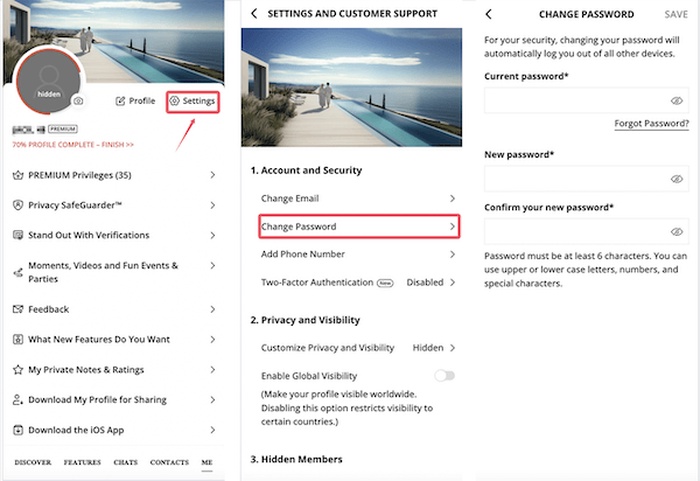 Step 1: Log in to your SeniorMatch account
Visit www.seniormatch.com and click the “Log In” button at the top right corner of the homepage.
Enter your email address and current password, then click “Sign In.”
Step 2: Go to your profile menu
Once you're logged in, tap the “ME” icon located at the bottom right corner of the screen.
Step 3: Select “Settings”
From the dropdown menu, choose “Settings”. This will take you to your personal account management page.
Step 4: Click on “Change Password”
On the Settings page, locate the “Change Password” option. Click on it to open the password update form.
Step 5: Enter your current and new password
You’ll be asked to: Enter your current password; Enter your new password; Confirm your new password by typing it again.
Tip: Make sure your new password is strong — use a mix of letters, numbers, and symbols.
Step 6: Click “Save” to confirm your changes
After filling in all fields, click the “Save” or “Update” button. You should see a confirmation message indicating that your password has been successfully changed.
What to Do If You Forgot Your Password?
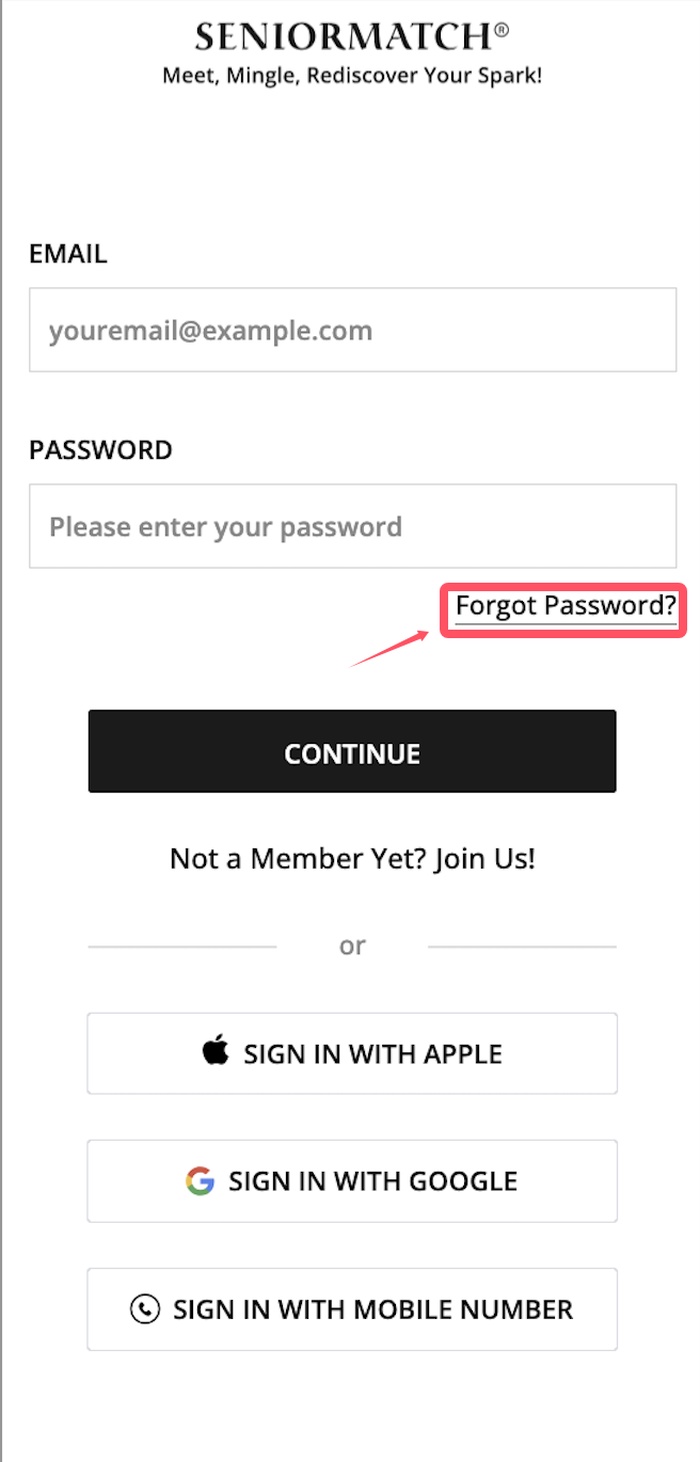 If you can't remember your current password, don’t worry — resetting it is simple.
- Go to the SeniorMatch login page.
- Click on “Forgot Password?” under the login form.
- Enter the email address you used to register your account.
- Check your inbox for a password reset email from SeniorMatch.
- Click the link in the email and follow the instructions to create a new password.
Tip: If you don’t see the email, check your spam or junk folder. The email usually arrives within a few minutes.
Still Need Help?
If you’re unable to reset your password using the steps above, please contact our support team for further assistance.
Password Safety Tips
Keeping your account secure starts with using a strong password. Here are a few tips to help you protect your SeniorMatch profile:
Use a Strong, Unique Password: Choose a password that includes a mix of uppercase and lowercase letters, numbers, and special characters (like !, @, #). Avoid using obvious choices like your name, birthdate, or “123456.”
Change Your Password Regularly: We recommend updating your password every 3 to 6 months, especially if you log in from shared devices or public networks.
Don’t Reuse Passwords: Don’t use the same password you use for other websites or services. If one account is compromised, all others become vulnerable.
Watch Out for Phishing Emails: SeniorMatch will never ask for your password via email. If you receive a suspicious message, do not click any links, and report it to our support team.
Use Two-Factor Authentication (if available): For added security, enable two-factor authentication (2FA) if it's supported. It adds an extra layer of protection to your account.
Frequently Asked Questions (FAQ)
Q: I forgot my current password. Can I still change it?
A: If you can’t remember your current password, you won’t be able to change it from within your account. Instead, use the “Forgot Password?” link on the login page to reset it via email.
Q: Can I change my password from my mobile phone?
A: Yes! SeniorMatch is mobile-friendly. Just log in on your phone’s browser or use the app, and follow the same steps under Account Settings to change your password.
Q: Will changing my password log me out of other devices?
A: In most cases, changing your password will log you out of other active sessions. This helps protect your account if someone else was signed in without your permission.
Keep your account secure. Changing your password regularly is a simple but powerful step to protect your online dating experience.
Need help fast? Visit our Help Center or reach out to our friendly support team any time.